

You’ve sent 30 applications this month. Two clients viewed them. Nobody replied. If that sounds familiar, your Upwork proposal is probably the problem, not your skills.
The good news? Proposals are one of the easiest things to fix. A few small changes in how you open, what you show and how you end can double the replies you get.
Let’s start with what clients actually see, then work through seven tips you can use on your very next application.
What a Client Sees in the First Five Seconds
When a client opens their list of applicants, they don’t see your full message. They see your name, photo, rate, job success score and the first couple of lines you wrote.
That’s it. Those few lines decide whether they click or scroll past.
Now look at the opening most freelancers use: “Dear Sir, I am a hardworking professional with five years of experience.” It says nothing about the client, and the client knows it was pasted into fifty other jobs.
Before you write another Upwork proposal, make sure the page behind it is ready too. Our guide on how to build a winning profile on freelancing platforms covers what clients check after they click.
Tip 1: Be Picky About Which Jobs You Chase
Even the best Upwork proposal can’t save a bad match. Applying to everything burns Connects and drags down your numbers.
Go for jobs that fit your skills, budget and experience. Then look at the client: is their payment verified, have they hired before, what do past freelancers say about them?
Fresh posts are worth watching. A job posted an hour ago usually has fewer applicants than one that’s been open for three days.
Walk away from anything that asks for free test work, payment off the platform or an upfront “training fee.” The FTC lists these as classic signs of job scams.
Tip 2: Open With Their Problem, Not Your Biography
Here’s the same opening written two ways.
- Before: “Hello, my name is Ali and I have five years of experience in web design.”
- After: “You need a fast Shopify store live before your November sale. I’ve built three like it this year, each one launched in under two weeks.”
The second version mentions their deadline, their platform and their goal. It also proves you’ve done this before, all in two sentences.
Write your opening last if that helps. Once you know what you want to say in the rest of your Upwork proposal, the hook is much easier to find.
Tip 3: Prove You Actually Read the Post
Clients can tell when someone skimmed their post before writing an Upwork proposal. They can also tell when someone didn’t.
Pick one or two specific details from the job description and mention them. Their target audience, a tool they named, a problem they hinted at. Small details make a big difference.
If something in the post is unclear, say so and offer a sensible guess. “You didn’t mention a CMS. I’m assuming WordPress, but I’m happy to work in Webflow too.” That one line shows you think ahead.
Three Lines That Quietly Kill an Upwork Proposal
Some phrases appear in so many applications that clients skim straight past them.
- “I have read your job description carefully.” Show it instead of saying it.
- “I am the best fit for this job.” Let your results make that case.
- “Please check my profile.” The client wants the key points right here, not homework.
Cut these and you free up room for something more useful, like a real result or a smart question about the project.
Tip 4: Swap Adjectives for Results
“Hardworking.” “Passionate.” “Detail-oriented.” Clients read these words so often they stop seeing them.
Numbers stick. “I raised email open rates from 18% to 27% for a skincare brand” beats a paragraph of adjectives every time.
Attach only the samples that match this job. An Upwork proposal with three relevant pieces beats one with ten random ones.
No reviews yet? That’s normal at the start. Our tips on landing your first 5 reviews will help you build proof quickly.
Tip 5: Use a Simple Upwork Proposal Structure
You don’t need a long essay. Upwork’s own advice on creating a proposal that wins jobs is to keep it short and personal.
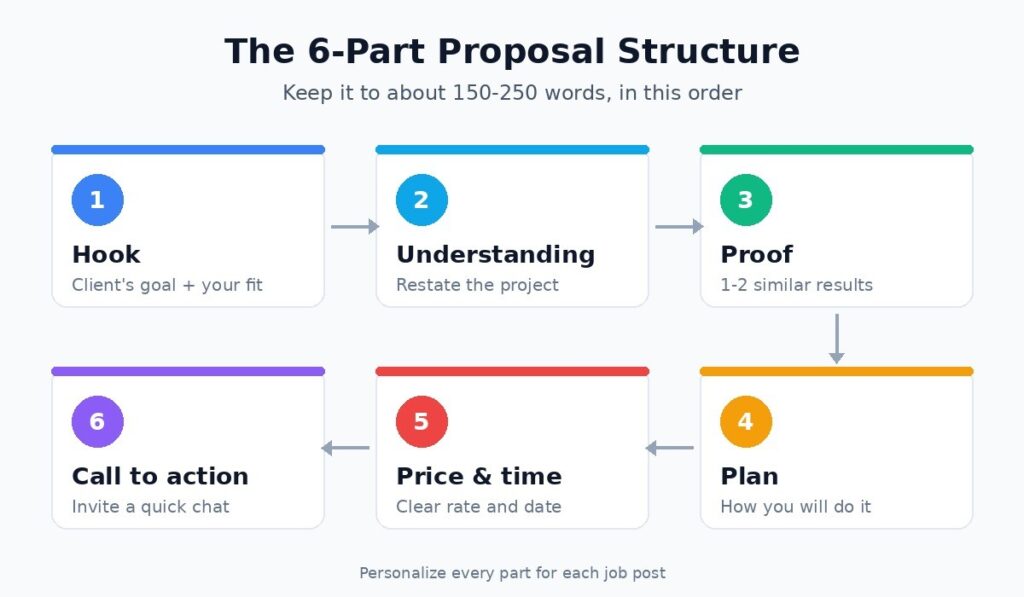
Alt text: Upwork proposal structure in six steps from hook to call to action
Six short parts, in this order, cover everything a client needs:
- Hook: one or two lines about their goal and why you fit.
- Understanding: their project, in your words.
- Proof: a result or sample that matches.
- Plan: two or three steps showing how you’d do it.
- Price and timeline: a clear number and a realistic date.
- Next step: a question or an invite to a quick call.
Aim for roughly 150 to 250 words. If they want more detail, they’ll ask in the interview.
A short Upwork proposal template
“Hi [name], you need [goal] by [deadline], and I can help. Last month I [similar result] for [type of client]. My plan: [step one], then [step two]. I can deliver in [time] for [price]. Want to see two related samples, or shall we do a quick 10-minute call?”
Use it as a skeleton, not a script. If a client could swap your name for someone else’s and nothing changes, rewrite it.
How Long Should an Upwork Proposal Be?
Shorter than you think. Many clients read applications on their phone between meetings, and big blocks of text get skipped.
Three or four short paragraphs is plenty. If the job is complex, use a few bullet points for your plan instead of adding more paragraphs.
And don’t skip the screening questions. Answer each one directly, in two or three sentences, using the client’s own words where they fit. Rushed answers can sink a strong Upwork proposal.
Tip 6: Price With Confidence and Spend Connects Carefully
Bidding low to win feels safe. It usually isn’t. Cheap bids attract difficult clients and make it hard to raise your rates later.
Say what’s included in your price. A clear breakdown builds trust and heads off scope fights.
Every application costs Connects. According to Upwork’s help page on understanding and using Connects, the number needed varies by job, each Connect costs $0.15, and they come back to you if the client cancels the post before hiring.
You can also bid extra Connects to push your message higher in a client’s list. Upwork explains how that auction works in its guide to boosting your proposal, including when the extra Connects are refunded.
Boosting helps on crowded jobs, but it can’t rescue a weak message. Save it for jobs where your Upwork proposal is a genuinely strong fit.
Fees add up quietly, so it’s worth knowing your real take-home pay. Our breakdown of freelancer platform fees walks through the numbers.
Tip 7: Follow Up, Then Look at Your Numbers
If a client viewed your message but went quiet, a short, friendly nudge after two or three days is fine. Keep it to one line and add something useful, like a relevant sample.
Then start a simple spreadsheet. For every Upwork proposal you send, note the job type, Connects spent, whether it was viewed and what happened.
After 20 or 30 entries, patterns jump out. Maybe small-budget jobs never reply. Maybe one opening line works far better than the rest. Do more of what works.
This also tells you your real cost per new client, which makes it much easier to decide how many Connects to buy.
A Quick Check Before You Hit Submit
- Does the first line mention the client’s goal?
- Have you referenced at least one detail from the post?
- Is there a number, result or matching sample?
- Did you include a price, a timeline and a next step?
- Did you answer every screening question?
- Is it short enough to read on a phone?
If any answer is “no,” fix it before you spend the Connects. One more minute here is often the difference between silence and a reply.
When the Client Writes Back
A reply is great, but it’s not a contract yet. Answer quickly, ideally within a few hours.
Get ready for a short interview. Confirm the scope, agree on milestones and put the key points in writing. Our article on what to include in a freelance contract lists the terms worth confirming.
Keep all work and payments on the platform. Going outside it means losing Upwork’s payment protection, and if things still go wrong, our guide to resolving Upwork and Fiverr disputes can help.
Do a great job, then ask for a review and more work. Repeat clients mean fewer cold applications and less time spent on each new Upwork proposal.
Should You Rely on Upwork Alone?
Upwork is huge, but it’s not the only option. Fiverr, Freelancer.com and smaller niche sites each suit different skills and pricing styles.
Our comparison of Upwork, Fiverr and Freelancer.com breaks down the differences. Over time, many freelancers also build a referral network, as we explain in platforms versus referral networks.
Your Next 10 Applications
Here’s a simple challenge. For your next ten jobs, apply only where you’re a strong match, open with the client’s problem, include one real result and keep each message under 250 words.
Track every one. Then compare your reply rate with last month.
Most people are surprised how much changes when each Upwork proposal is written for one client instead of fifty. For more guides on marketplaces and getting hired, browse our Freelancing Platforms category
