

LinkedIn for freelancers works differently from Upwork or Fiverr, and that difference is exactly why it’s worth your time. There’s no bidding war, no platform fee on your invoices, and no algorithm ranking you against hundreds of strangers for the same gig. Instead, clients find you through your profile, your network, and the things you post.
That freedom cuts both ways. LinkedIn for freelancers has no job feed handed to you. You have to set up your profile so it sells, show up consistently, and start conversations without sounding like spam.
This guide walks through seven practical steps, from fixing your headline to sending outreach messages people actually answer. It also covers the features that have changed, so you don’t waste time chasing tools that no longer exist.
Why LinkedIn for Freelancers Is Different From Marketplaces
On a marketplace, the client posts a job and dozens of freelancers compete for it. On LinkedIn, the relationship usually starts earlier. A marketing manager reads your post, checks your profile, and messages you weeks later when a project comes up.
The audience is also large. LinkedIn’s official company page lists more than 1.4 billion members. Many of them are the decision-makers who hire freelancers: founders, marketing leads, and operations managers.
Here’s how the two models compare in practice:
| Factor | Freelance marketplaces | |
| How clients find you | Job posts, search inside the platform | Profile search, posts, referrals, your network |
| Fees on your earnings | Platform takes a service fee | No commission on client payments |
| Competition | Many proposals per job | Fewer direct competitors per conversation |
| Speed to first client | Often faster for beginners | Usually slower, but relationships last longer |
| Payment protection | Built-in escrow or payment system | You handle contracts and invoicing yourself |
Neither option is better for everyone. Many people use marketplaces and LinkedIn for freelancers work side by side. If you’re weighing marketplaces, our comparison of Upwork vs Fiverr vs Freelancer.com breaks down each one.
7 Proven Steps to Use LinkedIn for Freelancers
Each step below builds on the one before it. You can finish the first three in a weekend, even if LinkedIn for freelancers is new to you.
1. Write a Headline That Says Who You Help
Your headline appears next to your name almost everywhere on the site: in search, in comments, and in connection requests. Most people waste it on a job title like “Freelancer” or “Graphic Designer.”
A better formula is simple: what you do, for whom, and the result. For example:
- “Brand designer helping SaaS startups look investor-ready”
- “Bookkeeper for Shopify stores | Clean books every month”
- “Video editor for coaches who post on YouTube”
Specific beats clever when you use LinkedIn for freelancers. A client should understand in two seconds whether you can help them.
2. Turn Your About Section Into a Short Sales Page
The About section is where a curious visitor decides whether to message you. Write it to the client, not about your life story.
A structure that works well:
- One line naming the problem your clients have.
- Two or three lines on how you solve it, with one concrete result.
- A short list of services.
- A clear next step, such as “Send me a message with your project details.”
Keep paragraphs short. Most people browsing LinkedIn for freelancers to hire read on their phone.
3. Set Up a LinkedIn Service Page
A Service Page lets you list what you offer directly on your profile, so people searching for a service can find you and send a request. According to this step-by-step Service Page setup guide, you can list up to 10 service types and add a description, work location (remote, in-person, or hybrid), and optional pricing.
On desktop, the guide describes the path as: open your profile, choose “Add profile section,” then “Add services.” Menus change often, so follow what you see on screen.
Two details matter. First, some extras, such as uploading media to the page, are tied to a Premium Business subscription, so check what your plan includes. Second, if you also run a Company Page, decide early whether you’ll manage services from your personal profile or the company. The same guide notes you can’t switch the management type later.
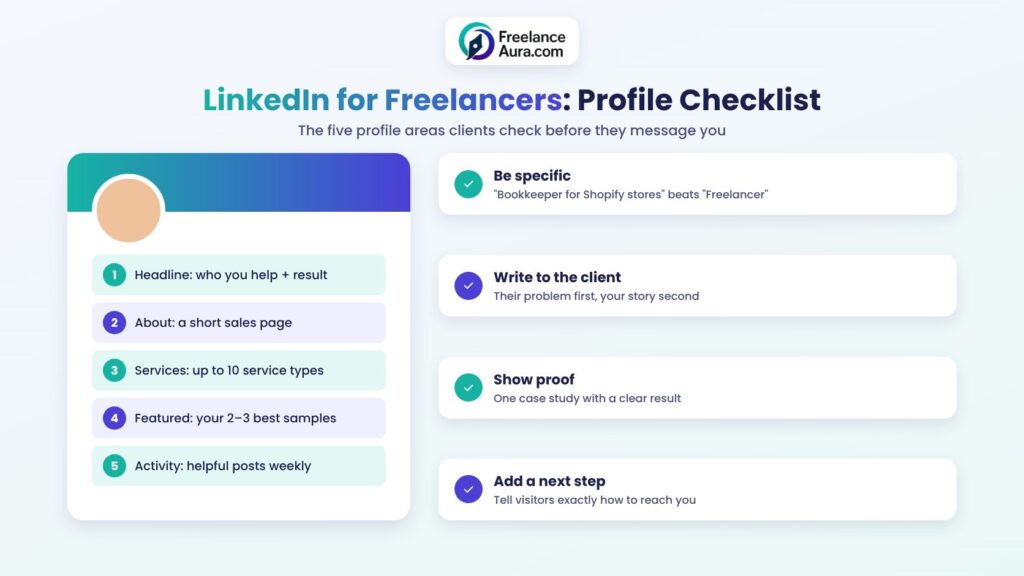
Alt text: LinkedIn for freelancers profile checklist covering headline, About, Services, Featured and activity
4. Use the Featured Section as Your Portfolio
The Featured section sits near the top of your profile and can hold posts, links, and documents. Use it to show your best two or three pieces of work, not ten.
Good choices include a case study with a clear result, a before-and-after sample, or a short client testimonial post. For ideas on what to include, see our guide to freelance portfolio tips that win first clients.
5. Post Content That Shows How You Think
Posting is how LinkedIn for freelancers turns from a static résumé into a steady source of leads. You don’t need to go viral. You need the right fifty people to remember you.
Aim for useful, specific posts. A few formats that tend to work for service providers:
- Mini case studies: the problem, what you did, and what changed.
- Mistakes you see: “Three things I fix in almost every client’s website.”
- Behind the scenes: how you plan a project or price a job.
- Quick tips: one small, practical idea a client could use today.
Two or three posts a week is plenty. Consistency matters more than volume. Commenting thoughtfully on posts by potential clients also counts, and it often gets more attention than your own posts at first.
6. Grow a Targeted Network
Connections matter because your posts reach them first. But a big network of random people won’t bring work. A smaller network of the right people will.
Building a network is the slow, steady part of LinkedIn for freelancers. Make a list of the job titles that hire you, then connect with people in those roles. Add a short, personal note that mentions something real, like a post they wrote or a shared group. Skip the instant pitch. Nobody likes being sold to in the first message.
Former colleagues, past clients, and classmates are also worth reconnecting with. They already trust you, and referrals from them often turn into your best projects. Our post on what happens once you build a referral network explains why these warm leads are so valuable.
7. Send Outreach Messages That Start Conversations
Outreach is where most people using LinkedIn for freelancers go wrong. A long sales pitch to a stranger rarely gets a reply.
Instead, keep the first message short and about them. Mention why you reached out, offer one small observation or idea, and ask an easy question. For example: “Saw your team is hiring for content roles. Are you also using freelancers for blog work, or keeping it all in-house?”
If they reply, then share how you help. For ready-made wording you can adapt, our email templates for freelancers translate well to LinkedIn messages too.
What Happened to LinkedIn ProFinder?
You’ll still find older articles recommending ProFinder, LinkedIn’s former service marketplace where clients posted requests and freelancers sent proposals. LinkedIn’s help center now lists ProFinder as no longer available.
For anyone researching LinkedIn for freelancers today, its role has largely moved to Service Pages and the broader services marketplace.
That marketplace launched in late 2021, and the U.S. Chamber of Commerce’s CO— covered how LinkedIn’s Services Marketplace works as a digital storefront where clients can request a proposal. In plain terms: don’t go looking for ProFinder. Put that energy into your Service Page and profile instead.
Common Mistakes When Using LinkedIn for Freelancers
A few habits quietly kill results:
- A vague headline. “Freelancer | Open to opportunities” tells a client nothing.
- Pitching in the connection request. It feels pushy and often gets ignored.
- Posting only self-promotion. If every post says “hire me,” people scroll past.
- Disappearing for months. An inactive profile looks like an inactive business.
- No clear call to action. Tell visitors exactly how to reach you.
Your soft skills show on LinkedIn more than anywhere else. How you comment, reply, and handle disagreement is visible to potential clients. These soft skills for freelancers are worth practicing in every interaction.
How Long Does It Take to Get Clients?
Honestly, success with LinkedIn for freelancers depends on your niche, your network, and how consistent you are. LinkedIn is usually slower than a marketplace for your very first client, because trust builds over repeated contact rather than one proposal.
A realistic plan is to give it at least three months of steady effort before judging results. During that time, track simple numbers each week: profile views, connection requests accepted, conversations started, and calls booked. If conversations are happening but not converting, look at your offer and pricing. If nobody is talking to you, fix your profile and posting first.
A Simple Weekly Routine
With LinkedIn for freelancers, results come from habits, not bursts of effort. Here’s a routine that fits into about three hours a week:
- Monday: publish one helpful post.
- Tuesday to Thursday: spend 15 minutes a day commenting on posts by people in your target market.
- Wednesday: send five personal connection requests.
- Thursday: publish a second post, such as a mini case study.
- Friday: follow up on open conversations and update your Featured section if you finished new work.
Adjust it to your schedule, but keep the rhythm steady.
Final Thoughts
Used well, LinkedIn for freelancers becomes a client channel you own, with no platform fees and no race to the bottom on price. It takes patience, but the clients who find you this way often stay longer and refer others.
Start your LinkedIn for freelancers plan with the basics this week: a clear headline, a client-focused About section, and a Service Page. Then add posting and outreach one step at a time. If you also sell on marketplaces, a strong profile there helps too. These tips on how to build a winning profile on freelancing platforms apply to LinkedIn as well.
Want more guides like this? Explore our full Freelancing Platforms category, or learn how to write an Upwork proposal that wins clients.
