

Project management tools for freelancers solve a problem most of us don’t notice until it bites: the work is fine, but the tracking is a mess. A deadline lives in an email, a client’s feedback sits in a chat app, and the to-do list is a sticky note that fell behind the desk.
When you only have one or two clients, memory works. Add a third project and a couple of revision rounds, and things start slipping. Not because you’re careless, but because nobody can hold twelve moving parts in their head.
This guide compares five popular project management tools for freelancers, using figures taken straight from each company’s pricing page. You’ll see what the free plans really include, where they stop, and which tool suits which kind of freelancer.
Why Solo Freelancers Need a System at All
A lot of people assume project management tools for freelancers are overkill, built for big teams instead. It isn’t. A solo freelancer is the whole team: salesperson, worker, account manager, and bookkeeper. That’s exactly why a single place for tasks pays off.
Good project management tools for freelancers give you three things:
- One list of everything due, so nothing hides in your inbox.
- A clear view of each client’s progress, which makes status updates quick.
- A record of what was agreed, which helps when a client asks for “one more small change.”
You don’t need anything fancy. Even the simplest project management tools for freelancers offer a basic board with three columns (To Do, Doing, Done) beats juggling notes across five apps.
What to Look For in Project Management Tools for Freelancers
Before comparing brands, decide what matters for your work. These five questions cover most needs:
- Is the free plan enough? Many solo workers never need to pay.
- Can clients see progress? Some tools make sharing easy; others are built for internal use only.
- What views do you need? A kanban board, a simple list, or a calendar for deadlines.
- How big are your files? Designers and video editors hit upload limits fast.
- Will it still fit next year? If you plan to hire help, check how many collaborators the free plan allows.
Keep your answers in mind as you compare project management tools for freelancers below. The “best” tool is the one that matches how you already work.
5 Project Management Tools for Freelancers Compared
All figures below come from each tool’s official pricing page, checked in October 2026. Prices are in US dollars. Plans and limits change often, so confirm on the pricing page before you sign up.
| Tool | Free plan highlights | Paid plan (lowest) | Best for |
| Trello | Up to 10 boards and 10 collaborators per Workspace, unlimited cards, 10MB per file | Standard: $5/user/month (annual) or $6 (monthly) | Visual thinkers who like kanban boards |
| Notion | Unlimited pages and blocks for a single member, 5MB file uploads, 7-day page history | Plus: $10/member/month (monthly) | Freelancers who want notes, docs and tasks in one place |
| Asana | Up to 2 users, unlimited projects and tasks, list, board and calendar views, 100MB per file | Starter: $10.99/user/month (annual) or $13.49 (monthly) | Structured projects with many steps and deadlines |
| ClickUp | Unlimited members, 60MB total storage, 5 active automation rules | Check the pricing page (plans were changing at the time of writing) | Power users who like to customize everything |
| Todoist | 5 personal projects, 5 people per project, 3 custom filters, 5MB files | Pro: $5/month (billed $60 yearly) or $7 monthly | Simple daily task lists across many small jobs |
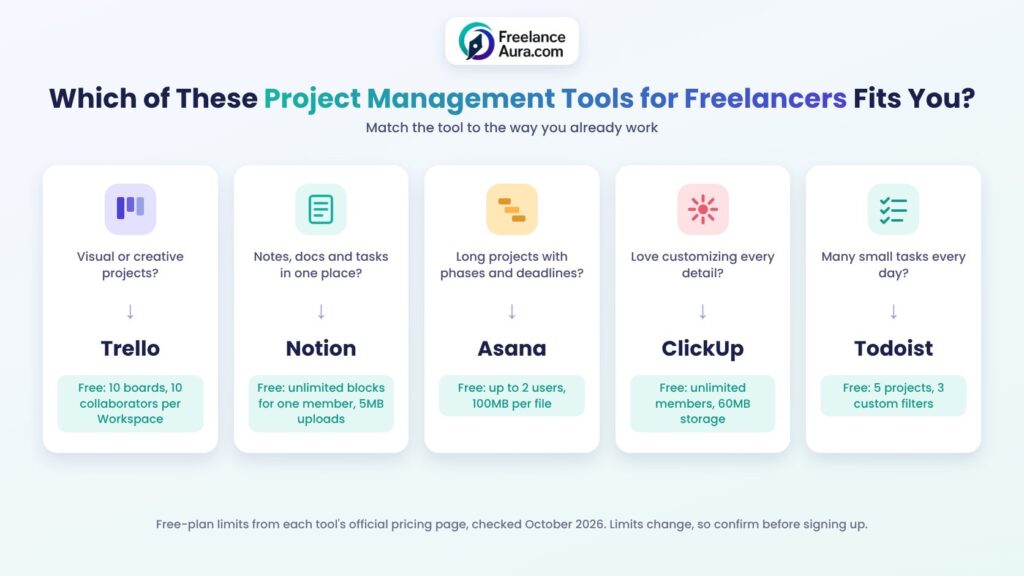
Alt text: Project management tools for freelancers chooser comparing Trello, Notion, Asana, ClickUp and Todoist free plans
1. Trello: Best for Visual, Board-Based Work
Trello is built around cards on a board. You drag a card from “To Do” to “Done,” and that’s most of the learning curve. Among project management tools for freelancers, it’s the easiest to pick up if you like seeing every project at a glance.
According to Trello’s pricing page, the free plan covers up to 10 boards and 10 collaborators per Workspace, with unlimited cards and a 10MB limit per file. Extra views like Calendar and Timeline sit in the paid tiers.
A practical setup: one board per client, with columns for Brief, In Progress, Client Review, and Done. Invite the client to their board, and they can follow along without emailing you for updates.
2. Notion: Best for an All-in-One Workspace
Notion is less a task app and more a blank workspace. You can build a client database, write proposals, keep meeting notes, and track tasks in the same place.
Notion’s pricing page says a single-member free workspace can add as many pages and blocks as it needs. The trade-offs are a 5MB limit on file uploads and only 7 days of page history.
The flexibility is also the risk. Some freelancers spend more time designing their Notion setup than doing client work. If that sounds like you, start with a template and resist rebuilding it every week.
3. Asana: Best for Structured, Multi-Step Projects
Asana shines when a project has many steps, dependencies, and dates. Think of a website build with content, design, development, and testing phases.
Asana’s pricing page lists a free plan for up to 2 users, with unlimited projects and tasks, plus list, board, and calendar views. Files can be up to 100MB each, which helps if you share large drafts.
The two-user cap is the key detail. It’s great for you plus one client contact, but it gets tight if a client wants three people in the loop.
4. ClickUp: Best for Freelancers Who Love to Customize
ClickUp tries to do almost everything: tasks, docs, whiteboards, goals, and automations. If you enjoy tweaking tools until they fit perfectly, it gives you plenty to play with.
ClickUp’s pricing page lists unlimited members on the free plan, but only 60MB of total file storage and 5 active automation rules. That storage cap matters if you attach design files or videos.
Its paid plan structure was being reworked when this guide was written, so check the page for current prices rather than relying on older reviews.
5. Todoist: Best for Simple Daily Task Lists
Boards and timelines aren’t for everyone, and the simplest project management tools for freelancers are often the ones that get used. If your work is lots of small jobs, such as a virtual assistant handling a dozen quick requests a day, a clean task list is often enough.
Todoist’s pricing page shows a free plan with 5 personal projects, up to 5 people per project, and 3 custom filters. The Pro plan costs $5 per month when billed at $60 a year, or $7 billed monthly.
Its strength is speed. You can type “Send invoice to Sara every Friday” and it understands the date and repeat pattern.
How to Choose the Right Tool in 10 Minutes
Comparing project management tools for freelancers can eat a whole afternoon. A faster way is to match the tool to your main type of work:
- Mostly visual or creative projects? Start with Trello.
- Lots of writing, notes, and client documents? Try Notion.
- Long projects with clear phases and deadlines? Asana fits well.
- You enjoy building custom systems? ClickUp gives you room.
- Many small, quick tasks each day? Todoist keeps it simple.
Then run a one-week test. Put one real client project into the tool and use it every day. If you’re still opening it by Friday without forcing yourself, keep it. If not, try the next option on your list.
Setting Up Your First Freelance Workspace
Whichever of these project management tools for freelancers you pick, a simple structure works better than a clever one. Here’s a setup that suits most solo freelancers:
1. Create one project or board per client. It keeps conversations and files separate.
2. Use four stages: Not Started, In Progress, Waiting on Client, and Done.
3. Add due dates to every task that has a real deadline, and skip them for “someday” ideas.
4. Keep a separate “Admin” project for invoices, proposals, and your own marketing.
5. Review everything for ten minutes each Monday. Move finished items, flag anything stuck.
That “Waiting on Client” column is the quiet hero. It shows you, at a glance, which delays aren’t your fault, and it reminds you to follow up. Our email templates for freelancers include ready-made follow-up scripts for exactly those moments.
If you repeat similar projects, turn your setup into a reusable checklist. This guide to building a freelancer SOP library shows how, and our freelancer workflow template from inquiry to invoice gives you a starting structure.
Pairing Project Management Tools for Freelancers With Other Apps
Project management tools for freelancers work best as part of a small, connected toolkit rather than on their own. Two pairings make a big difference.
Time tracking. Knowing how long each task really takes helps you price better and spot projects that quietly lose money. See our guide to time tracking for freelancers for options that fit a solo workflow.
Browser shortcuts. Several of these tools have browser extensions that let you turn an email or web page into a task in one click. Our list of Chrome extensions for freelancers covers more ways to save clicks.
Try not to connect everything at once, though. Every new integration is one more thing to maintain. Add a connection only when you notice the same manual step happening again and again.
Common Mistakes to Avoid
Even the best project management tools for freelancers fail when they’re used badly. Watch out for these traps:
- Switching tools every month. The setup time adds up, and your history gets scattered.
- Building a system that’s too complex. If updating a task takes longer than doing it, simplify.
- Inviting clients without guidance. Explain which columns matter and where to leave feedback, or they’ll just email you anyway.
- Ignoring the free plan limits. Hitting a file or user cap mid-project is stressful. Check the limits before you commit.
- Tracking tasks but not deadlines. A list without dates is just a wish list.
Is It Worth Paying for a Plan?
For many solo workers, the free versions of these project management tools for freelancers are enough for a long time. Paying makes sense when a limit starts costing you time, such as running out of boards, needing more collaborators, or hitting storage caps.
A simple rule: if a paid feature saves you more than an hour a month, it usually pays for itself. Compare that to your hourly rate before deciding. Most of these tools also offer annual billing at a lower monthly price, which helps once you’re sure you’ll stay.
Final Thoughts
The right project management tools for freelancers don’t make you more organized by magic. They give your work a home, so your brain can focus on the actual job instead of remembering what’s due next.
Pick one of these project management tools for freelancers, set up a single client project this week, and give it seven honest days. Small, steady habits beat the perfect system you never finish building.
Want more ways to work smarter? Try these 10 time-saving hacks every freelancer should try, or explore our full Tips, Tools & Productivity category.
