

Count how many times last month you wrote “Just following up on the invoice.” Or “Here’s where the project stands.” If it’s more than a few, email templates for freelancers will give you hours back.
Most client emails follow the same handful of patterns, which is why email templates for freelancers work so well. Rewriting them from scratch every time wastes energy you could spend on real work.
Below are nine ready-to-use scripts that cover a whole project, from the first inquiry to the final review request. Copy them, adjust a few words, and save them in your email app.
Why Templates Make You Sound Better, Not Robotic
Some people worry email templates for freelancers feel cold. In practice, the opposite usually happens. A tested template is clearer than a rushed email typed at 11 p.m.
The trick is to treat each one as 80% ready. Always add one or two personal lines, such as the client’s name, a project detail or a quick thank-you.
Good templates also keep your tone consistent, which builds trust. That’s one of the soft skills for freelancers clients notice most.
How to Save Email Templates for Freelancers in Gmail and Outlook
Both major email apps can store email templates for freelancers, so you don’t need extra software.
In Gmail, templates need to be switched on first. Google’s guide to creating a template in Gmail explains the steps: go to Settings, open the Advanced tab, enable Templates and save. After that, write your message, open the three-dot menu in the compose window and choose Templates, then Save draft as template.
In the new Outlook, Microsoft’s guide to creating email templates in Outlook uses a feature called My Templates. Open a new message, select My Templates, click +Template, give it a title, add your text and save.
Give each template a clear name, like “03 Project update” or “08 Payment reminder,” so you can find it in seconds.
The 9 Scripts, in Project Order
These email templates for freelancers follow a typical project from start to finish. You won’t need all nine every time, but having them ready means you’ll never stare at a blank screen.
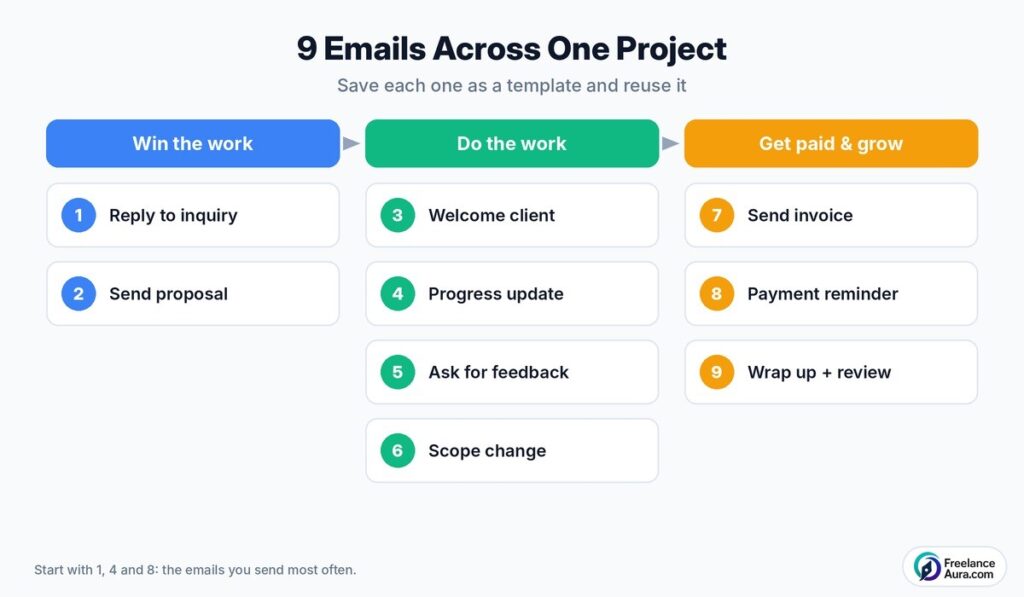
Alt text: Email templates for freelancers mapped across a project from first inquiry to review request
1. Replying to a new inquiry
Use this when a potential client first gets in touch.
“Hi [Name], thanks for reaching out about [project]. It sounds like a great fit. To give you an accurate quote, could you share [two or three key details, such as deadline, scope and budget range]? Once I have those, I’ll send a proposal within [one business day].”
2. Sending your quote or proposal
Keep it short and point to the attached details.
“Hi [Name], as promised, here’s my proposal for [project]. In short: [main deliverables], delivered by [date], for [price]. The full scope and timeline are attached. If it looks good, I can start on [start date]. Happy to adjust anything that doesn’t fit.”
3. Welcoming a new client
Send this as soon as the deal is confirmed. It sets the tone for the whole project.
“Hi [Name], I’m excited to get started on [project]! Here’s what happens next: [step one], [step two], [step three]. To begin, I’ll need [files or access]. You can expect your first update on [date]. If anything comes up, this email is the best way to reach me.”
4. Sharing a progress update
Short, regular updates stop clients from worrying.
“Hi [Name], quick update on [project]. Done this week: [items]. Next up: [items]. Anything I need from you: [request, or ‘nothing right now’]. We’re on track for [deadline].”
A useful trick from Harvard Business Review’s piece on writing email with military precision is adding a clear keyword to the subject line, such as INFO, REQUEST or ACTION, so the reader knows what’s needed before opening.
5. Asking for feedback or approval
Specific questions get faster, more useful answers.
“Hi [Name], the first draft of [deliverable] is ready here: [link]. Could you let me know by [date]: 1) Does the overall direction feel right? 2) Is anything missing? Once I have your notes, I’ll send the revised version within [time].”
6. Handling a scope change
Use this when a client asks for something beyond the agreement. Stay friendly and clear about cost.
“Hi [Name], happy to help with [new request]. It’s outside our original scope, so here’s what it would involve: [extra work], adding [time] and [cost]. Would you like me to go ahead, or keep it for a later phase?”
Our guide to handling scope change without losing money covers this conversation in more depth.
7. Sending an invoice
Make paying easy, with every detail in one place.
“Hi [Name], please find attached invoice [number] for [project or month], totaling [amount]. Payment is due by [date] via [method]. Thanks again, it’s been great working on this with you.”
8. A polite payment reminder
Most late payments are simple oversights. Assume good intent in the first reminder.
“Hi [Name], a quick reminder that invoice [number] for [amount] was due on [date]. I’ve attached it again for convenience. Could you let me know when payment is scheduled? Thank you!”
If the first reminder doesn’t work, our guide to handling late-paying clients has firmer follow-ups that keep the relationship intact.
9. Wrapping up and asking for a review
End the project on a high note and plant the seed for future work.
“Hi [Name], here are the final files for [project]: [link]. It’s been a pleasure working together. If you’re happy with the result, a short review or testimonial would mean a lot. And if you know anyone who needs help with [service], I’d be grateful for an introduction.”
Subject Lines That Get Opened
A great email doesn’t help if it sits unopened. Make every subject line say what the email is and what you need.
- “Proposal: website redesign for [Company]”
- “REQUEST: feedback on homepage draft by Friday”
- “Weekly update: [project], on track”
- “Invoice 1042 for October, due 15 November”
Save a subject line with each of your email templates for freelancers, so the whole message is ready in one click.
How to Personalize Email Templates for Freelancers in 60 Seconds
A template should never read like a form letter. Before sending, make three quick changes:
- Use their name and project. Never leave a placeholder in brackets. Read it once before hitting send.
- Add one specific detail. Mention something from your last call or their business.
- Match their tone. If they write casually, loosen up. If they’re formal, stay formal.
That’s usually all it takes. The structure saves time; the personal touch keeps the email human.
Can You Use These on Upwork or Fiverr?
Yes. Platform chat works the same way, even if it isn’t email. Most messages you send there are inquiry replies, updates and delivery notes.
Keep a copy of your email templates for freelancers in a notes app, so you can paste them into any platform’s chat box. Just remove anything that breaks the platform’s rules, such as personal contact details or payment links outside the site.
Mistakes to Avoid With Templates
- Sending a template with the wrong client’s name in it.
- Using the same subject line for every email, so nothing stands out.
- Writing long paragraphs when two short lines would do.
- Forgetting to update prices, dates or links from the last project.
- Never reviewing templates, so they slowly go out of date.
Set a reminder to review your email templates for freelancers every three months. Cut what clients ignore and keep what gets quick replies.
Keep a Swipe File of Emails That Worked
Every so often, a client replies with “This is so clear, thank you.” When that happens, save that email.
Over time, these real messages become your best source of new templates. They’re already proven with real clients, and they sound like you.
A simple folder or label called “Good emails” is enough. Review it when you update your email templates for freelancers, and borrow the phrases that got the best responses.
Make Templates Part of Your System
Email templates for freelancers work best as part of a bigger process. Our freelancer workflow template from inquiry to invoice shows where each email fits.
You can also store your scripts in a shared document alongside other repeatable tasks. See our guide to building a reusable SOP library for a simple way to organize them.
For even faster typing, a text expander or browser add-on can paste common phrases with a shortcut. A few options appear in our list of Chrome extensions for freelancers.
Which Email Templates for Freelancers to Set Up First
If nine feels like a lot, start with three: the inquiry reply, the progress update and the payment reminder. Those are the emails most freelancers send most often.
Add the other email templates for freelancers as you need them. Within a month or two, you’ll have a full set built from your own real projects.
Your 15-Minute Setup
Open your email app now, turn on templates and save your first three scripts. It takes about 15 minutes.
Next time a client emails, you’ll reply in a fraction of the time, with clearer wording and fewer mistakes. Those saved minutes add up to hours over a year, which is exactly why email templates for freelancers are worth the effort.
Looking for more ways to work smarter? Read our 10 time-saving hacks every freelancer needs, or explore the full Tips, Tools & Productivity category.
