

You published your first Fiverr gig two weeks ago. You check the stats every morning. Impressions: a handful. Clicks: two. Orders: none.
It’s frustrating, but it’s also very common. Most new gigs struggle for the same few reasons: a vague title, weak images, confusing packages or a description that talks about the seller instead of the buyer.
The good news is that all of these can be fixed in an afternoon. Below are seven steps based on Fiverr’s own help pages, plus the practical habits that help new sellers land their first orders.
How Buyers Actually Find and Choose a Gig
Buyers usually type a search, scan a grid of thumbnails, then click two or three that look right. Inside, they skim the packages, glance at reviews and decide fast.
That means two things matter most. First, your gig has to show up in search. Second, it has to win the click and the order once it does.
Everything in a Fiverr gig serves one of those two jobs. Your title and tags help you get found. Your images, packages and description help you get chosen.
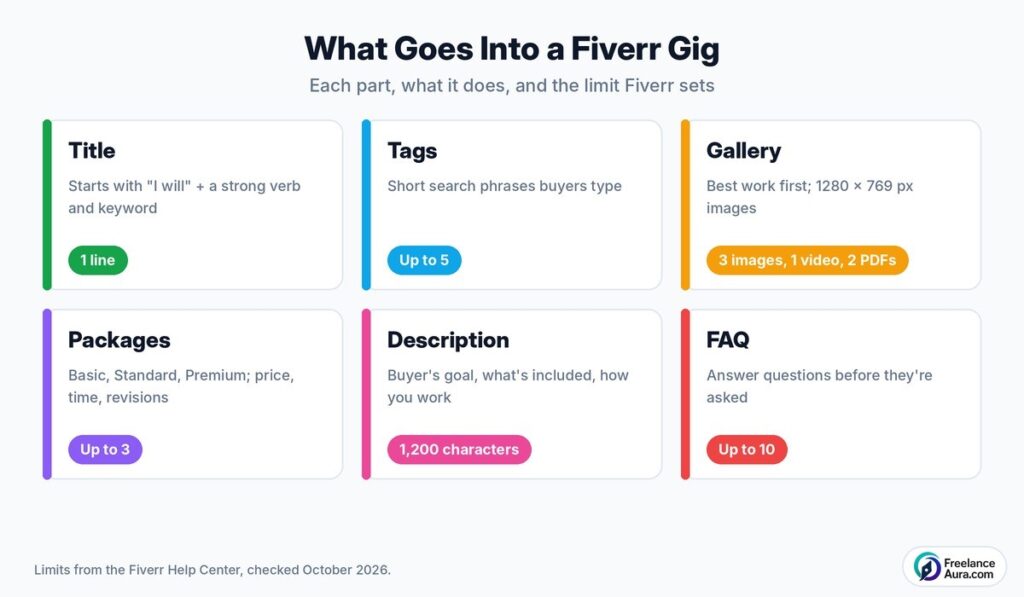
Alt text: Anatomy of a Fiverr gig showing title, gallery, packages, description, FAQ and tags with limits
The diagram above shows each part of a gig, along with the limits Fiverr sets for it.
Step 1: Write a Fiverr Gig Title Buyers Would Search For
Every title starts with “I will.” Fiverr’s Gigs best practices page recommends following that with a strong verb and your most relevant keyword.
- Weak: “I will do amazing work for your business”
- Better: “I will design a modern minimalist logo for your brand”
The better version tells buyers exactly what they get and matches what people actually type. Fiverr’s Creating a Gig guide also warns against special characters such as &, /, ” and +.
Look at the top results in your subcategory for ideas, but don’t copy them. Use their wording to understand what buyers search, then write your own.
Step 2: Choose the Right Category and Tags
Pick the most specific category and subcategory that fits your service. A Fiverr gig for logos buried in a general “design” category is much harder to find.
You can add up to five tags. Use the short phrases a buyer would search, like “minimalist logo” or “brand identity,” not random single words.
Browse your subcategory to see which tags come up often, then pick the ones that truly describe your Fiverr gig. Irrelevant tags might bring clicks, but they rarely bring orders.
Step 3: Make Your Images Do the Selling
Your first image is your Fiverr gig’s shop window. In a grid of thumbnails, it’s the only thing a buyer sees besides your title and price.
According to Fiverr’s page on Gig images and the gallery, the recommended size is 1280 × 769 pixels, the minimum is 712 × 430, and each gallery can hold up to three images, one video and two PDFs.
A few tips that help:
- Show a real example of your work, not a stock photo.
- Keep any text on the image short and readable on a phone.
- Use clean, bright colors that stand out in search results.
- Add a short video if you can. Fiverr notes that gigs with videos tend to perform better.
Videos should run around 20 to 60 seconds. A quick screen recording of your process is often enough.
Step 4: Build Packages That Make Choosing Easy
A Fiverr gig can have up to three packages: Basic, Standard and Premium. Each needs a price, a delivery time and a number of revisions. The minimum price is $5, and some categories set a higher floor.
Make the difference between packages obvious. Here’s a simple example for a logo designer:
| Package | What’s included | Delivery |
| Basic | 1 logo concept, PNG file, 1 revision | 3 days |
| Standard | 3 concepts, source files, 3 revisions | 4 days |
| Premium | 5 concepts, brand colors and fonts, unlimited revisions | 5 days |
Most buyers pick the middle option, so make Standard your best value. And remember that Fiverr keeps a share of each order. Its best practices page says sellers receive 80% of the purchase amount, so price with that in mind.
Our breakdown of freelancer platform fees compares Fiverr’s cut with other marketplaces.
Add extras for more value
Gig Extras let buyers add things like faster delivery, extra revisions or source files on top of a package. Fiverr’s best practices recommend using them for add-ons instead of cramming everything into the main packages.
Keep extras simple and useful. Two or three well-chosen ones can raise your average order value without confusing anyone.
Step 5: Write a Description for the Buyer, Not for You
Your Fiverr gig description can be up to 1,200 characters. That’s short, so every line has to work.
Open with the buyer’s problem and the result you deliver. Then cover what’s included, what isn’t, the tools you use, your turnaround time and how revisions work. Fiverr’s best practices suggest exactly these points.
Write in short lines with a few bullet points. Many buyers read on their phone, and a wall of text gets skipped.
End with a simple invitation: “Message me before ordering if you’d like to discuss your project.” It encourages questions, which often turn into orders.
A Sample Fiverr Gig Description
Here’s a short example for a logo designer. Use it as a guide for structure, then write your own in your own words.
“Need a logo that looks professional on your website, packaging and social media? I design clean, modern logos for small businesses and startups.”
“What you get: original concepts based on your brief, print-ready and web-ready files, and revisions until you’re happy within your package. What I don’t do: copies of existing brands or logos built from stock icons.”
“I work in Adobe Illustrator and usually deliver the first concepts within three days. Message me before ordering if you’d like to talk through your idea.”
It’s under 1,200 characters, it speaks to the buyer’s goal first, and it answers the usual questions before they’re asked.
Step 6: Use FAQs and Requirements to Prevent Problems
You can add up to 10 FAQs. Use them to answer the questions buyers ask most, like “Do you provide source files?” or “Can you match my existing brand colors?”
Then set up your requirements section. List everything you need to start: files, examples, brand details, deadlines. Clear requirements mean fewer delays and fewer unhappy buyers.
Good FAQs and requirements also reduce disputes. If something does go wrong, our guide to resolving Upwork and Fiverr disputes can help.
Step 7: Win Your First Orders and Keep Momentum
A brand-new Fiverr gig has no reviews, so trust is your biggest hurdle. A few habits make a real difference.
- Reply fast. Quick responses to messages make a strong first impression.
- Deliver early. Beating your own deadline is an easy way to earn great reviews.
- Over-communicate. Send a short update halfway through each order.
- Ask for feedback. After delivery, politely invite the buyer to leave a review.
Our guide on landing your first 5 reviews has more ideas for this early stage. Make sure your seller profile is just as polished as your gig, too; see how to build a winning profile on freelancing platforms.
Fiverr Gig Mistakes That Quietly Kill Sales
- A title stuffed with keywords that reads like a robot wrote it.
- Blurry or text-heavy thumbnails that look like every other result.
- Three packages that are almost the same, so buyers can’t tell them apart.
- A description full of “I” and “me” with nothing about the buyer’s goal.
- Slow replies, especially in the first few weeks.
- Asking buyers to pay or talk outside Fiverr, which breaks the platform’s rules.
Fixing even two of these often lifts clicks noticeably. Start with the thumbnail and the title, since they decide whether anyone opens your Fiverr gig at all.
How to Improve a Fiverr Gig After It Goes Live
Publishing is the start, not the finish. Check your gig stats every week: impressions, clicks and orders.
- Few impressions? Rework your title, category and tags.
- Impressions but few clicks? Your thumbnail or starting price needs work.
- Clicks but no orders? Look at your packages, description and reviews.
Change one thing at a time on your Fiverr gig and give it a week or two. That way you’ll know what actually helped.
As reviews come in, raise your prices step by step. Fiverr’s own advice is to adjust rates as your reputation grows.
Should You Rely on Fiverr Alone?
Fiverr works brilliantly for clearly packaged services. If your work is more custom or long-term, another platform may suit you better.
Compare the options in our Upwork vs. Fiverr vs. Freelancer.com comparison, or look at lesser-known platforms with low competition.
Your One-Hour Fiverr Gig Makeover
Got an hour today? Use it like this:
- Rewrite your title with a strong verb and one clear keyword.
- Replace your first image with a real, bright work sample.
- Make your three packages clearly different.
- Cut your description to the buyer’s goal, what’s included and how you work.
- Add five FAQs from questions buyers already asked you.
Small changes, done well, are what separate a gig that sits quietly from one that brings in steady orders.
For more marketplace guides, explore our Freelancing Platforms category.
