

Certifications for freelancers can help you win work, but only some of them, and only in the right situations. A badge on your profile won’t replace good samples. It can, however, settle a client’s doubts when two freelancers look equally strong.
The problem is that the market for certifications for freelancers is crowded. Some programs cost real money and months of effort. Others are free and take an afternoon. Knowing which is which saves you both time and cash.
This guide covers six credentials that tend to carry weight with clients, what each one involves, and when you’re better off spending the time on your portfolio instead.
Do Clients Actually Care About Certificates?
Honestly, how much clients value certifications for freelancers depends on the client and the kind of work.
A small business owner hiring a logo designer will look at the designs, not the paperwork. A company handing you access to its cloud servers or its ad budget is different. They’re trusting you with something expensive, and a recognized credential lowers their risk.
Here’s a simple way to think about it:
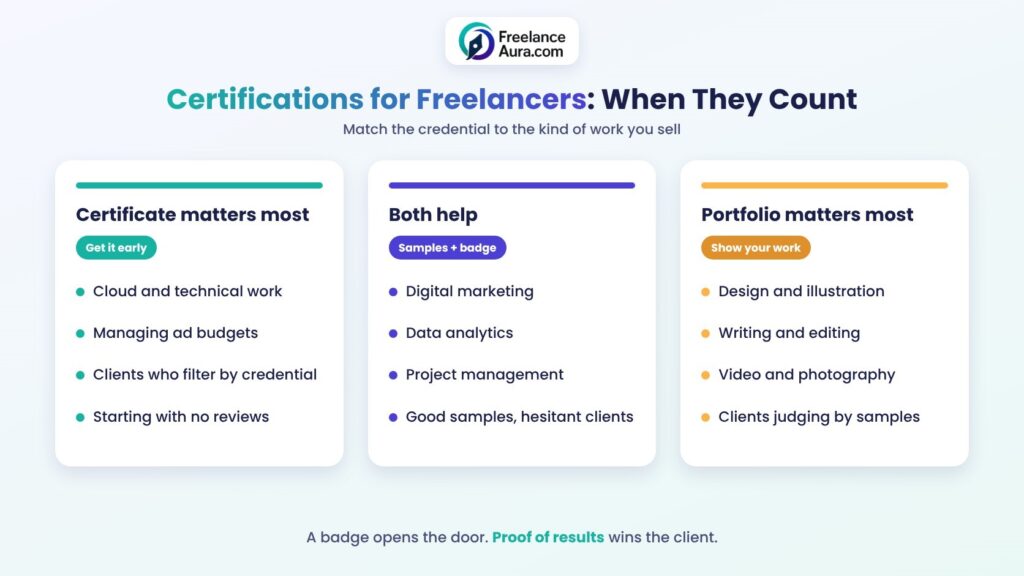
- Certificates matter more when the work is technical, when mistakes cost money, or when the client can’t easily judge quality from samples alone.
- Certificates matter less in creative fields, where clients can see your skill directly.
- Certificates help most early on, before you have reviews and case studies to point to.
Freelance marketplaces also make room for them. Upwork, for example, lets you add certifications to your profile. Its help article on adding certifications to your Upwork profile explains that you can pick from a verified list or add up to two custom ones, which don’t get a verified badge.
How to Judge Certifications for Freelancers Before You Enroll
Before spending money or months on any of the many certifications for freelancers, run each one through four quick questions:
1. Is the issuer known to your clients? A credential from a company clients already use, like Google or AWS, needs no explanation.
2. Does it test you, or just track attendance? An exam you can fail means more than a certificate you get by watching videos.
3. What does it really cost? Count exam fees, monthly subscriptions, and renewal costs.
4. Does it expire? Some badges need renewing every year. That’s not bad, but it’s ongoing work.
If a program fails most of these, skip it. If it passes, it might be worth adding to your list.
6 Proven Certifications for Freelancers Worth Considering
Prices and details below come from each provider’s official page at the time of writing. They change, so always check the provider page before you pay.
| Certification | Best for | Cost (as listed) | Time or format |
| Google Career Certificates | Beginners in data, UX, IT, marketing, project management | $49/month on Coursera in the US and Canada, after a 7-day trial | 3–6 months at under 10 hours a week |
| Google Ads certifications | PPC and ad freelancers | Training is free; check Skillshop for the exam | Valid for one year |
| HubSpot Academy | Content, email, social and inbound marketers | Courses are free | Self-paced |
| AWS Certified Cloud Practitioner | Cloud, DevOps and technical freelancers | $100 exam fee | 90 minutes, 65 questions, valid 3 years |
| Meta Certification | Social media ad specialists | Check the provider page | Proctored exams |
| PMI CAPM | Project managers and virtual assistants | Check the provider page | Exam-based |
Alt text: Certifications for freelancers chart showing when a certificate matters most, when both help, and when a portfolio matters most
1. Google Career Certificates
These are beginner-friendly programs in areas like data analytics, project management, cybersecurity, digital marketing and e-commerce, IT support, and UX design. According to the official Google Career Certificates page, they run on Coursera, need no prior experience, and usually take three to six months at under ten hours a week.
Among certifications for freelancers, they suit someone starting from zero who wants structure. The catch is time. At a monthly subscription, the faster you finish, the less you pay, so set a weekly schedule before you sign up.
2. Google Ads Certifications
If you manage ad campaigns, this is one of the quickest wins. The training lives on Google’s Skillshop platform, which describes its courses as free. There are separate certifications for Search, Display, Video, Shopping, and Apps.
One detail matters: Google’s help page on Google Ads certifications says each one stays valid for one year, then you retake the assessment. Put a renewal reminder in your calendar the day you pass.
3. HubSpot Academy Certifications
HubSpot Academy offers free courses on inbound marketing, content marketing, email marketing, social media, and sales. For freelance writers and marketers, these are a low-risk way to learn the vocabulary clients use.
Because they’re well known in marketing circles, these are some of the easiest certifications for freelancers to add to a profile. Just don’t expect them alone to win you work. Pair them with real samples.
4. AWS Certified Cloud Practitioner
This is the entry-level AWS exam. The official AWS Certified Cloud Practitioner page lists a $100 fee, a 90-minute exam with 65 questions, and a three-year validity period.
For developers, it’s one of the more respected certifications for freelancers, because it signals that you understand cloud basics, which reassures clients before they give you access to their accounts. It’s a foundation, though. Serious cloud work usually calls for the more advanced AWS certifications later.
5. Meta Certification
Meta offers proctored certification exams for people who run ads on Facebook and Instagram. If social media advertising is your main service, it’s a recognized way to show you know the ad tools.
Fees and exam details change, so check Meta’s own certification page before you book. Treat this one as a bonus for specialists rather than a starting point.
6. PMI CAPM
The Certified Associate in Project Management, from the Project Management Institute, is a respected entry-level project management credential. It’s useful for virtual assistants and freelancers who coordinate projects for clients.
It involves an exam and eligibility requirements, and the fee differs for PMI members and non-members. Check PMI’s official site for the current requirements and cost before you commit.
When Your Portfolio Matters More
Here’s the honest truth: for most freelance work, clients hire proof. A certificate says you studied something. A portfolio shows you can actually do it.
If you have to choose where to spend the next month, use this rule of thumb:
- No samples yet? Build two or three portfolio pieces first. Our tips on building a freelance portfolio that wins first clients show you where to start.
- Good samples, but clients still hesitate? That’s when certifications for freelancers can tip the balance.
- Technical or high-risk work? Get the credential early, because clients may filter for it.
Many freelancers also skip the soft side entirely. Clear communication and reliability often matter more than any badge, so keep working on your soft skills as a freelancer alongside anything technical.
Free vs Paid Certifications for Freelancers
Free options like HubSpot Academy and Google’s Skillshop training are great for testing a field before committing. If you discover you hate ad management, you’ve lost nothing but a few evenings.
Paid certifications for freelancers make sense once you’re sure of your direction. They usually go deeper and carry more weight. We cover this decision in detail in our post on free vs paid courses for freelancers.
One warning: be careful with expensive programs that promise guaranteed clients or income. No certificate can promise that.
How to Show Certifications for Freelancers on Your Profile
Earning certifications for freelancers is only half the job. Presenting them well is the other half.
A few practical tips:
- Put the most relevant one first. A Google Ads badge belongs at the top of a PPC profile, not buried under unrelated courses.
- Link it to your work. In proposals, connect the credential to the client’s problem. “I’m Google Ads certified and recently cut a client’s cost per lead” is stronger than listing the badge alone.
- Keep it current. An expired certificate can look careless. Renew or remove it.
- Don’t overload your profile. Five unrelated certificates look scattered. Two strong, relevant ones look focused.
If you’re writing proposals on Upwork, our guide to Upwork proposal tips shows how to weave credentials into a pitch without sounding like a CV.
Common Mistakes to Avoid
A few patterns waste freelancers’ time and money again and again:
- Collecting badges instead of clients. Ten certificates and zero proposals sent is a sign you’re hiding behind learning. Set a cap: one new credential, then go pitch.
- Choosing by popularity, not by client demand. A trendy certificate is useless if your target clients have never heard of it. Look at job posts in your niche and note which credentials they mention.
- Forgetting renewal dates. Some badges expire. Letting one lapse while it’s still on your profile can make clients question your attention to detail.
- Paying for what’s free. Many beginner programs offer free learning material. Check the official source before buying a third-party course that teaches the same thing.
A quick reality check helps here. If you’ve finished a program and still can’t explain the skill to a client in plain words, practice more before you add the badge to your profile.
Building a Learning Plan Around Certifications for Freelancers
Certifications for freelancers work best as one step in a bigger plan, not as the whole plan.
Start by choosing your direction. If you’re unsure which skill fits you, read how to choose the right freelancing skill for your personality. Then check how quickly different skills tend to pay off with our guide on how long it takes to start earning with freelancing skills.
Once you’ve picked a path, a simple plan looks like this:
1. Learn the basics through free material.
2. Build one or two small projects.
3. Earn one relevant certification.
4. Land a first client and collect a review.
5. Add a deeper credential only if your clients care about it.
For a full step-by-step approach, our zero to pro roadmap for mastering any freelancing skill breaks the journey into stages.
Final Thoughts
The right certifications for freelancers are the ones your clients recognize and that match the work you actually sell. For technical and ad-management work, a credential from Google, AWS, or a similar issuer can open doors. For creative work, your portfolio will almost always speak louder.
Pick one credential that fits your main service, finish it within a set timeframe, and put it to work in your very next proposal. Then let real results do the rest.
Want to keep building your skills? Browse our Skill Development & Learning category for more practical guides.
