

A freelance invoice is the last thing you send on a project, and often the one you put the least thought into. You finish the work, fire off a quick PDF, and then wait. And wait.
Here’s what most freelancers learn the slow way about getting paid: a lot of late payments aren’t caused by bad clients. They’re caused by unclear invoices. A missing due date, a vague line item, or no bank details can push your payment to the bottom of someone’s pile.
This guide walks through what to put on every invoice, which rules apply in the UK and US, how to set payment terms clients actually respect, and the small mistakes that quietly delay your money.
What Is a Freelance Invoice?
An invoice is a formal request for payment. It tells the client what you did, how much they owe, and when and how to pay.
A freelance invoice is different from a receipt. A receipt confirms money has already arrived, while an invoice asks for it. It’s also different from a quote, which is an estimate given before the work starts.
For many clients, especially larger companies, your freelance invoice is also an accounting document. Their finance team may need it to approve the payment, record the expense, and claim tax deductions. If it’s missing key details, it can get sent back or stuck in approval.
What Every Freelance Invoice Should Include
Requirements depend on where you work, so it’s worth checking your local rules. In the UK, the government’s guide on what an invoice must include is a clear starting point. It lists these essentials:
- A unique identification number
- Your name or business name, address and contact details
- The client’s company name and address
- A clear description of what you’re charging for
- The date the work was provided (the supply date)
- The invoice date
- The amount charged, any VAT, and the total owed
Sole traders in the UK must also show their own name alongside any business name they use. If you’re VAT-registered and so is your client, you’ll need a full VAT invoice, which has extra requirements.
Beyond the legal minimum, add a few practical details to each freelance invoice so you get paid faster:
- A due date, written as a real date, not just “Net 30”
- Payment methods, with bank details or a payment link
- A purchase order or project reference, if the client gave you one
- A short thank-you line, which costs nothing and keeps the tone warm
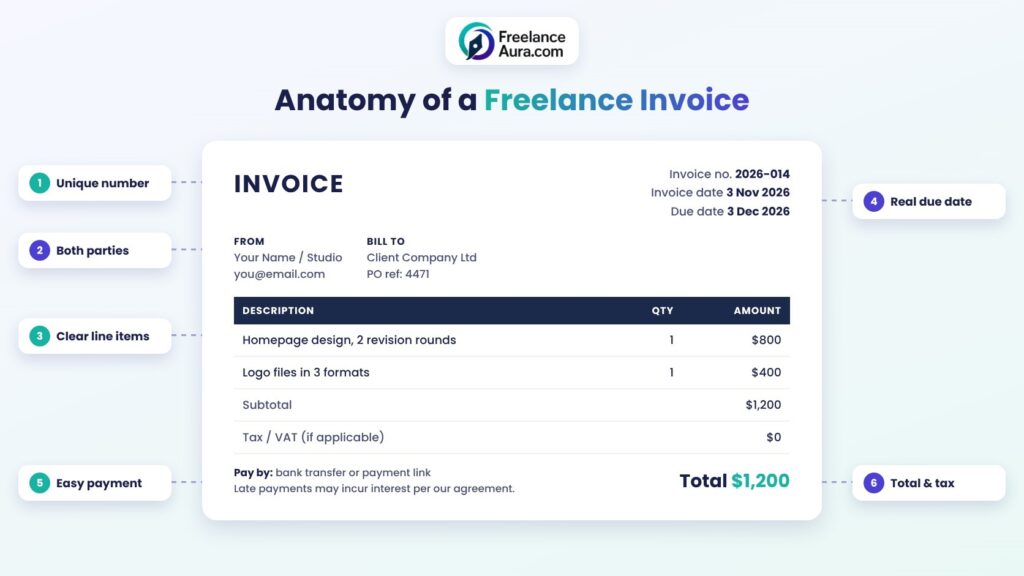
Alt text: Freelance invoice example labeled with invoice number, client details, line items, due date, payment details and total
9 Essential Freelance Invoice Tips to Get Paid on Time
Knowing what goes on the page is step one. The tips below are about how you use it.
1. Agree on Payment Terms Before You Start
Your invoice should never be the first time a client hears about your terms. Put the payment period, deposit, and late fee policy in your contract, then repeat them on the invoice.
If you need help with that part, our guide to freelance contracts and the clauses that protect you covers payment terms in detail.
2. Use a Simple, Consistent Numbering System
Every freelance invoice needs its own number. A clean system makes it easy for you and your client to track payments.
Two common formats work well:
- Sequential: 001, 002, 003
- Year plus sequence: 2026-001, 2026-002
Avoid reusing numbers or skipping around. If a client’s accounts team asks about “invoice 2026-014,” you should be able to find it in seconds.
3. Write Line Items a Stranger Could Understand
“Design work – $1,200” might make sense to you. To the person approving payments, it means nothing.
Break the work into clear items. For example: “Homepage design, 2 revision rounds – $800” and “Logo files in 3 formats – $400.” Clear items reduce questions, and fewer questions mean faster approval.
4. Set a Clear Due Date
“Due on receipt” sounds firm, but it’s easy to ignore. A specific date on your freelance invoice is harder to brush aside.
It also helps to know the default rules. In the UK, the government’s page on late commercial payments explains that if no date is agreed, payment is late 30 days after the client receives the invoice or the work is delivered, whichever is later. Agreed business payment periods should usually be within 60 days.
5. Make Paying You Effortless
Every extra step between your freelance invoice and a finished payment gives a client a reason to delay. Include your bank details, a payment link, or both. If you work internationally, say which currency you expect and who covers transfer fees.
A good test: could your client pay you from their phone in under two minutes using only the invoice? If not, simplify.
6. Send It Promptly
Invoice as soon as the work is approved, or on the schedule in your contract. Waiting a week “to be polite” simply pushes your payment back a week.
For longer projects, consider milestone invoices instead of one big bill at the end. Smaller, regular payments are easier for clients to approve and much better for your cash flow.
7. State Your Late Fee Policy
A short line such as “Late payments are subject to interest as stated in our agreement” sets expectations without sounding aggressive.
In the UK, businesses can claim statutory interest on late business-to-business payments of 8% plus the Bank of England base rate, unless the contract sets a different rate.
The government also lists fixed recovery sums you can add: £40 for debts under £1,000, £70 for £1,000 to £9,999.99, and £100 for £10,000 or more. Rules differ in other countries, so check what applies to you before charging fees.
8. Follow Up Calmly and on Schedule
Set reminders: one a few days before the due date, one on the day, and one a week after. Keep each message short and friendly, and attach the freelance invoice again so the client doesn’t have to search for it.
If a client still doesn’t pay, our guide on handling late-paying clients without burning the bridge walks through the next steps. Ready-made reminder wording is also in our email templates for freelancers.
9. Keep Copies of Everything
Save every freelance invoice you send, along with payment confirmations. You’ll need them at tax time and in any dispute.
In the US, the IRS notes in its recordkeeping guidance for small businesses that the general rule is to keep records for three years, though the right period depends on what the record covers. Other countries have their own rules, and some require longer, so check locally.
Freelance Invoice Tools: Template or Software?
You don’t need expensive software to send a professional invoice. Here’s how the main options compare:
| Option | Best for | Watch out for |
| Word or Google Docs template | A few clients a month, simple projects | Manual numbering and no automatic reminders |
| Spreadsheet template | Freelancers who like tracking totals in one place | Easy to make formula or copy-paste errors |
| Invoicing or accounting software | Regular clients, multiple currencies, recurring bills | Monthly fees and a learning curve |
| Platform invoicing (Upwork, Fiverr) | Work won on that platform | Only covers jobs on that platform, with its own fees |
Start with a simple freelance invoice template if you’re new. Move to software once you’re sending more than a handful of invoices a month, or when chasing payments starts eating your time.
Common Freelance Invoice Mistakes
These small errors cause a surprising share of payment delays:
- Sending it to the wrong person. Ask who handles payments before the project starts. It’s often not your main contact.
- Missing the client’s PO number. Some companies can’t process an invoice without one.
- Vague dates. “Due in 30 days” from when? Use a real calendar date.
- Math errors. One wrong total can send the whole invoice back for correction.
- Billing for extra work nobody approved. If the scope grew, agree on it first. Our guide on how to handle scope change without losing money shows how.
- Unprofessional file names. “invoice_final_v3.pdf” looks careless. Try “YourName-Invoice-2026-014.pdf.”
What to Do If a Client Questions Your Invoice
Sometimes a client pushes back on an item or the total. Don’t take it personally, and don’t go silent.
Reply quickly and point to the agreement: the scope, the rate, and any approved changes. If the client is right about a mistake, send a corrected freelance invoice with a new number, and note which one it replaces. If they’re wrong, explain calmly and attach the email where they approved the work.
Most disputes are really misunderstandings. Clear line items and written approvals settle them in one or two messages.
A Simple Freelance Invoice Checklist
Before you hit send, run through this quick list:
- Unique invoice number
- Your details and the client’s details
- Clear, itemized description of the work
- Supply date, invoice date, and due date
- Amounts, any tax, and the total
- Payment methods and currency
- PO or project reference, if needed
- Late fee note that matches your contract
It takes less than a minute, and it can save you weeks of waiting.
Final Thoughts
A good invoice won’t fix a bad client. But it removes every easy excuse for paying late, and it shows you run a real business, not a side hustle.
Set up one clean template, agree on terms before the work starts, and send invoices the day work is approved. Those three habits alone will smooth out your cash flow more than any clever follow-up email.
Once your billing is in order, it may be the right time to raise your freelance rates or tighten up your wider freelance business finance. For more money guides, explore our full Freelance Business & Finance category.
