

Say you quoted $800 for a website landing page and guessed it would take 10 hours. That’s $80 an hour. Not bad. But the revisions, the extra calls and the “quick tweak” emails stretched it to 16 hours, and your real rate quietly dropped to $50. This is exactly why time tracking for freelancers matters.
Most of us guess how long things take. The guesses are almost always too low.
Tracking your hours fixes that. You’ll see where your week really goes, price your next project with real numbers and stop working for less than you think. Here are seven easy ways to make it happen.
What Time Tracking for Freelancers Really Shows You
On a salary, a task that runs long costs you nothing extra. As a freelancer, every extra hour comes straight out of your earnings.
Tracking also uncovers the work nobody pays for directly: emails, calls, revisions, invoicing, chasing payments. Added together, these tasks can eat a full day each week.
And there’s a confidence bonus. When a client questions an invoice or a deadline, clear records answer the question for you.
1. Start With a Two-Week Experiment
Don’t overthink the setup. The easiest way to begin time tracking for freelancers is a simple experiment: for two weeks, log everything.
That means client work, but also email, research, learning, marketing, admin and calls. Be honest. Nobody else needs to see it.
By day 14, you’ll have a real picture of your week. Most people are surprised. A lot of freelancers find that only about half their hours are billable.
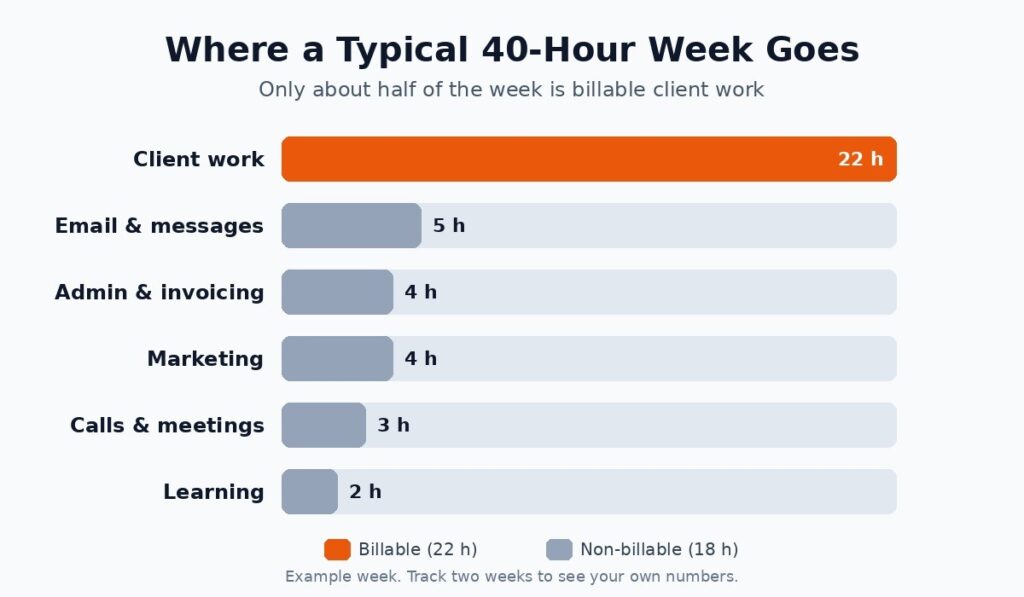
Alt text: Time tracking for freelancers chart showing billable and non-billable hours in a week
The example above is typical. Client work takes the biggest slice, but email, admin and marketing together take almost as long.
What Two Weeks of Data Can Teach You
Here’s a made-up but very common example. A copywriter tracks two weeks and finds she bills about 21 hours a week, not the 32 she assumed.
Where did the rest go? Around six hours to email, four to unpaid revisions and the remainder to small admin jobs she’d never counted.
So she makes three changes: revisions capped at two rounds, email checked twice a day, invoicing batched on Fridays. A month later, her billable hours are close to 28.
Her skills didn’t change at all. The difference was that she finally had numbers to act on.
2. Pick a Tool You’ll Actually Open Every Day
When it comes to time tracking for freelancers, the best tool is the one you don’t forget about. A fancy app with twenty features won’t help if starting a timer feels like a chore.
These three popular tools all have free plans that work for solo freelancers:
| Tool | Free plan highlights |
| Clockify | Unlimited time tracking for up to 5 users, with timer, timesheet and reports |
| Toggl Track | Free for up to 3 users, with timers, calendar sync and personal reports |
| Harvest | 1 seat and 2 projects, with time tracking, invoicing and expenses |
Plans change, so check the Clockify pricing page, the Toggl Track pricing page and the Harvest pricing page before you choose.
A browser add-on makes starting a timer even quicker. You’ll find a few in our list of Chrome extensions for freelancers.
3. Tag Your Hours So They Tell a Story
A pile of hours is mildly interesting. Sorted hours are where the useful answers live.
- Client: which clients take the most of your time?
- Project: how do estimates compare with reality?
- Task type: design, writing, revisions, calls, admin.
- Billable or not: how much of your week actually earns money?
Keep the list short. Five to eight task types is plenty. Too many tags and you’ll stop bothering.
Set up well, time tracking for freelancers stops being a log and becomes a simple business report you can read in five minutes.
4. Turn Your Hours Into Better Prices
After a few weeks of time tracking for freelancers, you’ll have something better than a hunch: real data from real projects.
Before quoting a new job, look up similar past ones. How long did they really take? Add 10 to 20 percent for revisions and surprises, then price from there.
Compare your actual hourly rate across clients too. The “big” client who pays the most per project might turn out to be your lowest-paying one once you count every call and revision.
Numbers also help when a project starts growing. Our guide to handling scope change without losing money shows how to bring them into that conversation. For the bigger money picture, see our freelance business finance tips.
5. Find the Leaks and Plug Them
Consistent time tracking for freelancers shows exactly where hours slip away. The usual suspects are constant email checks, long unplanned calls and hopping between tasks.
That last one is sneakier than it looks. The American Psychological Association reports that switching between tasks can cost as much as 40 percent of someone’s productive time.
Batch similar jobs. Check email two or three times a day instead of every ten minutes. Group small admin tasks into one block on Friday.
If home distractions are the problem, our guide to beating distractions while working from home has practical fixes.
6. Let the Timer Double as a Focus Tool
A running timer does something odd: it makes you less likely to wander off to social media. Pair it with a focus method and the effect gets stronger.
Many people work in 25 to 50 minute blocks with short breaks between. Your tracker then shows how many focused blocks you actually finish each day.
Our article on the Pomodoro method and 3 powerful alternatives can help you find a rhythm that fits.
Give it a month and you’ll know your best hours. Put your hardest work there and save easy tasks for the slump.
7. Spend 20 Minutes Each Friday With Your Numbers
Data only helps if you look at it. Friday afternoon works well for a short review.
- Total hours worked, and how many were billable.
- Estimated versus actual hours for each project.
- The biggest time leak of the week.
- Your real hourly rate per client.
- One thing to try differently next week.
It’s a small habit, but the changes add up. A few months in, you may be working fewer hours and earning more.
A weekly review is what turns time tracking for freelancers from a record of the past into a plan for next week.
Time Tracking for Freelancers on Fixed-Price Projects
Yes, maybe even more. On a fixed price, your profit depends on finishing within the hours you planned.
Tracking tells you halfway through if you’re on budget, not after it’s too late. If a project’s running over, you can spot why: piling revisions, a shifting brief or a slow feedback loop.
Over time, your fixed quotes get sharper. It’s one of the most underrated benefits of time tracking for freelancers.
Should Clients See Your Time Logs?
On hourly work, sharing logs builds trust. Clients see what they’re paying for, and billing questions mostly disappear.
On fixed-price jobs, keep the hours to yourself and use them to improve your own pricing.
Some clients ask for logs before approving a bigger budget. Having them ready makes you look organized.
Keep entries short and plain, like “Homepage layout, revision round 2.” Clean records also back you up if a client pays late; our guide on handling late-paying clients explains how.
How Time Tracking for Freelancers Protects Your Energy
This isn’t only about money. Tracking also shows when you’re working too much.
If your logs show 55-hour weeks for a month straight, burnout isn’t far off. Seeing that number in black and white makes it easier to set limits.
Pick a weekly cap that feels sustainable and plan real days off. Rested people make fewer mistakes and do better work.
Use time tracking for freelancers to protect your time, not to guilt yourself into squeezing out every last minute.
The Habits That Make It Stick
Habits stick when they’re easy, and time tracking for freelancers is no exception. A few small rules help:
- Morning: open your tracker and list your top three tasks.
- While working: start a timer for every task, even five-minute ones.
- End of day: make sure every entry has a client, project and task type.
Forget timers a lot? Turn on idle detection or a reminder, which most apps offer. And if you want tracking built into your whole process, see our freelancer workflow template from inquiry to invoice and our guide to building a reusable SOP library.
Start Your First Timer Today
Time is the only thing every freelancer sells, yet plenty never measure it. That’s a bit like running a shop without counting the stock.
You don’t need perfect data to get value from time tracking for freelancers. Rough records beat guesses, and they get more useful every week.
So pick a free app, start one timer and run your two-week experiment. What you learn in that first month can change how you price, plan and work for years.
Want more ways to win back hours? Try our 10 time-saving hacks every freelancer needs, or browse the Tips, Tools & Productivity category.
